
Download Project Management Software – Gantt Chart Tool, Task Tracking App, Team Collaboration Tool
Overview
The software is designed as a project management solution aimed at helping teams plan, track, and deliver projects efficiently. It enables users to create detailed project timelines using a Gantt chart interface, providing a visual representation of task schedules, dependencies, and progress. The tool is particularly useful for teams that need to coordinate multiple tasks across different team members and track completion percentages in real time. It supports collaboration through task comments, file sharing, and team invitations, making it suitable for remote and in-office teams alike.
Target users include project managers, team leads, and professionals in industries such as construction, marketing, software development, and event planning. The software supports managing multiple projects within a single Gantt view, allowing for centralized oversight. Real-world use cases include planning a product launch, organizing a marketing campaign, or managing a software development sprint. The developer did not provide additional details about the company or background.
Key Features & Capabilities
- Drag-and-Drop Scheduling: Users can easily adjust task start and end dates by dragging tasks directly on the Gantt chart, simplifying timeline adjustments without complex inputs.
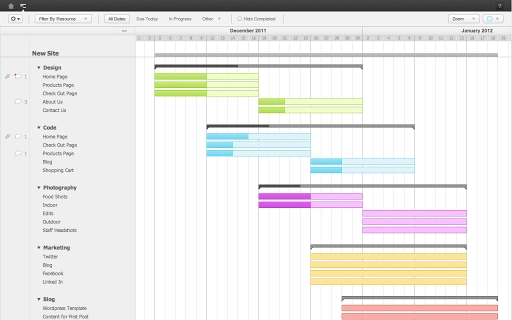
- Visual Gantt Chart View: A color-coded timeline displays tasks, milestones, and dependencies, enabling teams to quickly identify delays or bottlenecks.
- Multi-Project Management: The ability to view and manage multiple projects in one Gantt chart helps maintain an overview of all ongoing work.
- Resource Filtering: Users can filter tasks by assigned team members to assess workload distribution and avoid over-allocation.
- Progress Tracking: The % Complete feature allows team members to update task progress as work is completed, providing real-time visibility into project status.
- Team Collaboration Tools: Team members can comment on tasks, upload files, and be invited to projects, fostering transparent communication.
These features support efficient workflow management, especially in environments where team coordination and schedule adherence are critical. For example, a project manager can monitor task completion across departments, adjust timelines based on feedback, and ensure resources are balanced.
User Interface, Workflow & Performance
The user interface is structured around a clean, intuitive Gantt chart layout, with task bars, timeline headers, and navigation panels. Navigation is streamlined through menu options and toolbar tools, allowing users to switch between projects, adjust views, and access settings. The drag-and-drop functionality enhances usability, reducing the learning curve for new users.
Workflow efficiency is improved by the ability to update task progress, assign resources, and communicate within the same environment. The integration of comments, file uploads, and real-time updates minimizes context switching. However, exact performance details were not specified. The developer did not provide information on CPU or RAM usage, nor did they share benchmarks for responsiveness under heavy workloads. General software behavior patterns suggest stable operation, but specific performance metrics remain unverified.
Compatibility & System Requirements
The software is compatible with Windows, Mac, and Linux operating systems, offering broad accessibility across desktop platforms. It is available in version 2.1.0 with an installation size of 500MB. The developer did not specify exact system requirements, such as minimum RAM, processor speed, or disk space beyond the total file size.
Platform compatibility information is limited to the listed operating systems. Users should ensure their system meets general desktop application standards for running modern software. The developer did not provide details on whether the software requires an internet connection for core functionality or if offline usage is supported.
Pros and Cons
Pros
- Intuitive drag-and-drop interface for easy scheduling
- Comprehensive Gantt chart with visual progress tracking
- Supports multiple projects in a single view
- Effective team collaboration with comments and file sharing
- Resource filtering helps balance team workloads
- Free 30-day trial available for evaluation
Cons
- No detailed system requirements provided
- Performance under heavy load not documented
- Offline functionality not confirmed
- Limited information on update frequency or support
FAQ Section
Is the software compatible with Windows, Mac, and Linux?
Yes, the software is available for Windows, Mac, and Linux operating systems.
Is there a free version or trial available?
Yes, a free 30-day trial is offered before pricing plans begin at $10 per month.
Can I use this software offline?
The developer did not specify whether offline functionality is supported.
What kind of license does the software use?
Specific license details were not provided in the available information.
How often are updates released?
Information about update frequency was not included in the product details.
Final Thoughts + CTA
Project Management Software offers a robust set of tools for planning, tracking, and collaborating on projects using a visual Gantt chart interface. Its drag-and-drop scheduling, real-time progress updates, and team collaboration features make it a strong contender for teams seeking a centralized project management solution. While detailed system requirements and performance data are not available, the broad OS support and intuitive design enhance accessibility.
It is best suited for project managers, team leaders, and professionals in fast-paced environments who need to monitor multiple tasks and resources efficiently. The free trial allows users to evaluate the software before committing.
Download Project Management Software now







